
TNMCIS Login: A Simple Guide for Nurses and Midwives in Tanzania
Introduction
TNMCIS Login is the main gateway for nurses and midwives in Tanzania to access essential professional services online. Whether you are registering for the first time, renewing your license, or checking your professional status, this system brings everything into one convenient place.
If you are part of the nursing or midwifery profession, understanding how TNMCIS Login works can save you time, reduce paperwork, and help you stay compliant with professional requirements. This guide walks you through the process step by step, explains available services, and answers common questions so you can use the system with confidence.
What Is TNMCIS Login?
TNMCIS Login refers to access to the Tanzania Nursing and Midwifery Council Information System. It is an official online platform managed by the Tanzania Nursing and Midwifery Council (TNMC).
The system allows nurses and midwives to manage registration, licensing, renewals, verification, and professional development records in one centralized portal. Its goal is to make professional administration more transparent, efficient, and accessible.
How to Begin with TNMCIS Login
Before signing in, it helps to know whether you already have an account or need to create one.
-
New users will need to register first
-
Registered practitioners can proceed directly to TNMCIS Login
-
Employers and institutions may access verification services
Once you know your category, getting started becomes straightforward.
Step-by-Step Instructions for TNMCIS Login
Step 1: Visit the Official Portal
Open your browser and go to the official TNMCIS website:
👉 https://tnmcis.tnmc.go.tz/
This is the only official site for TNMCIS Login and related services.
Step 2: Enter Your Login Details
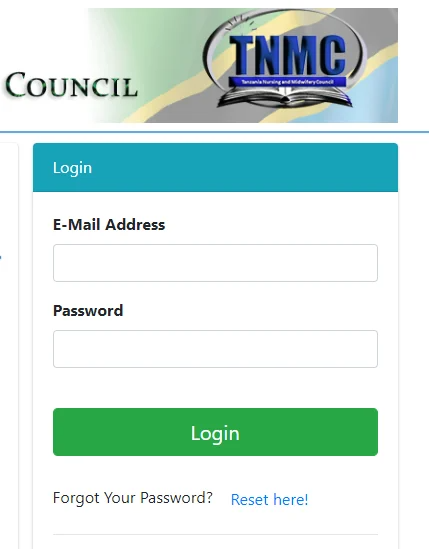
On the homepage, enter your registered email address or username along with your password in the login form.
Step 3: Access Your Dashboard
After successful TNMCIS Login, you will be directed to your personal dashboard. From here, you can view your profile, submit applications, track progress, and manage your professional records.
TNMCIS Registration for New Users
If you are new to the system, registration is required before using TNMCIS Login.
How to Register
-
Click the Register link below the login form
-
Select the appropriate application type
-
Fill in your personal details, contact information, and qualifications
-
Upload required documents
-
Review and submit your application
Once approved, you can proceed with TNMCIS Login using your created credentials.
Available Services Through TNMCIS Login
After logging in, users can access a range of professional services designed for nurses and midwives.
Licensing and Renewals
TNMCIS Login allows you to apply for:
-
New licenses
-
License renewals
-
Provisional registration
-
Temporary registration for foreign practitioners
All applications are submitted and tracked online.
Verification Services
Employers and institutions can verify:
-
Registration status
-
License validity
-
Professional standing
This helps maintain trust and accountability within the healthcare system.
Continuing Professional Development (CPD)
Through TNMCIS Login, practitioners can:
-
Record CPD activities
-
Track accumulated CPD points
-
Monitor compliance with professional requirements
What You Can Do After TNMCIS Login
Once inside your dashboard, you can:
-
Update personal details
-
Monitor application status
-
Download receipts and confirmations
-
View licensing history
-
Track CPD progress
Everything is organized in one place for easy access.
Resetting Your TNMCIS Login Password
If you forget your password:
-
Go to the TNMCIS Login page
-
Click on the Forgot Password option
-
Enter your registered email address
-
Follow the instructions sent to your email
This ensures secure and quick account recovery.
Checking Application or License Status
After submitting any application, TNMCIS Login allows you to:
-
View current status
-
See pending requirements
-
Confirm approvals or renewals
Regularly checking your dashboard helps you stay informed and avoid delays.
Tips & Quick Answers for TNMCIS Login
-
Always use the official TNMCIS website
-
Keep your login credentials secure
-
Ensure documents are clear and accurate before uploading
-
Check your dashboard regularly for updates
-
Use help desk contacts during working hours if needed
Different applications may have different support numbers, so confirm the correct one for your service.
Extra Notes About TNMCIS
TNMCIS was introduced to reduce manual processes and improve service delivery in the nursing and midwifery professions. By moving services online, the council ensures better record keeping, faster processing, and improved professional oversight.
Conclusion
TNMCIS Login is an essential tool for nurses and midwives in Tanzania. From registration and licensing to verification and professional development, the platform simplifies tasks that once required multiple visits and paperwork.
By understanding how TNMCIS Login works and using it correctly, you can manage your professional journey more smoothly and focus on what truly matters—your work in healthcare.
Go to our Homepage To Get Relevant Information.
Contents
- 1 TNMCIS Login: A Simple Guide for Nurses and Midwives in Tanzania
- 2 What Is TNMCIS Login?
- 3 How to Begin with TNMCIS Login
- 4 Step-by-Step Instructions for TNMCIS Login
- 5 TNMCIS Registration for New Users
- 6 Available Services Through TNMCIS Login
- 7 What You Can Do After TNMCIS Login
- 8 Resetting Your TNMCIS Login Password
- 9 Checking Application or License Status
- 10 Tips & Quick Answers for TNMCIS Login
- 11 Extra Notes About TNMCIS
- 12 Conclusion