
Mzumbe E Learning Login: A Simple Guide for Students and Staff
Introduction
The Mzumbe E Learning Login is your main access point to Mzumbe University’s online learning environment. It’s where students and staff connect to courses, learning materials, assignments, and academic updates—all in one place.
If you’re new to the platform or just want a clearer understanding of how it works, this guide is here to help. By the end, you’ll know how to log in, reset your password, explore available services, and make the most of the system without confusion.
How to Begin with Mzumbe E Learning Login
Getting started with the Mzumbe E Learning Login is straightforward. All you need is a device with internet access and your official Mzumbe University login details.
The platform works through a browser and also supports mobile access, making it flexible for both on-campus and remote learning.
Step-by-Step Instructions for Mzumbe E Learning Login
Follow these simple steps to access your account:
Step 1: Visit the Official Login Page
Open your browser and go to the official Mzumbe University e-learning portal:
https://elearning.mzumbe.ac.tz/
Step 2: Enter Your Login Details
On the login page, type in your username and password exactly as provided by the university.
Step 3: Click “Log in”
Once your details are entered, click the Log in button to access your dashboard.
If your details are correct, you’ll be taken directly to your course homepage.

What You Can Do After Mzumbe E Learning Login
Once logged in, the platform offers several useful tools designed to support learning and communication.
Access Course Materials
You can view lecture notes, presentations, readings, and uploaded resources for each registered course.
Submit Assignments
Assignments are uploaded and submitted directly through the system, with deadlines clearly displayed.
Take Quizzes and Assessments
Online tests, quizzes, and continuous assessments are managed within the platform.
Track Your Learning Progress
You can monitor completed activities, upcoming tasks, and overall course participation.
Available Services on the Platform
The Mzumbe E Learning Login connects you to a wider range of ICT and academic services, including:
-
Course announcements and updates
-
Discussion forums with lecturers and classmates
-
Academic calendars and schedules
-
Access to mobile app options for learning on the go
These services help keep learning organized and communication clear.
Resetting Your Password on Mzumbe E Learning Login
If you forget your password, you don’t need to worry. The platform includes a built-in recovery option.
How to Reset Your Password
-
On the login page, click Lost password?
-
Choose to search by username or email address
-
Enter the required information
-
Follow the instructions sent to your email to regain access
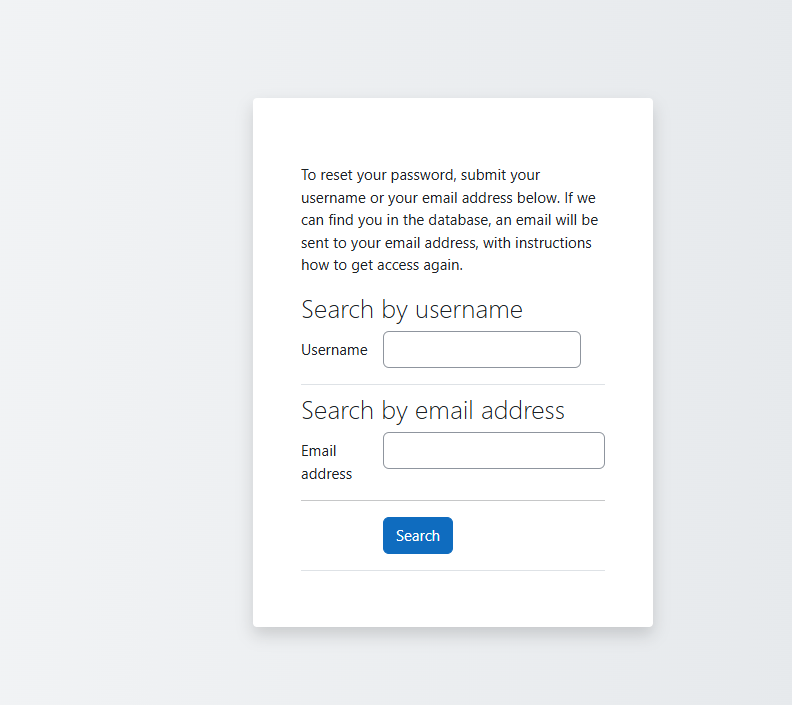
This process is secure and designed to get you back into your account quickly.
Need Help? Support Options Explained
If login issues continue, official support is available:
-
Email: helpdesk@mzumbe.ac.tz
-
ICT Help Desk Website: http://helpdesk.mzumbe.ac.tz
The ICT support team assists with login problems, system access, and technical concerns related to the e-learning platform.
Extra Notes About Mzumbe E Learning Login
The Mzumbe University Learning Management System is designed with data privacy in mind. User information, course content, and activity records are handled according to institutional data retention policies.
You may also see language options (such as English) and system notices indicating whether you are currently logged in or logged out.
Tips & Quick Answers
-
Always use your official university email when recovering passwords
-
Log out after using shared or public devices
-
Check announcements regularly for course updates
-
Use a stable internet connection for quizzes and submissions
Conclusion
The Mzumbe E Learning Login is an essential tool for managing your academic life at Mzumbe University. With easy access to courses, assignments, and support services, the platform keeps everything you need in one place.
By following the steps and tips in this guide, you can log in confidently, resolve common issues, and focus more on learning rather than technical hurdles.
Go to our Homepage To Get Relevant Information.
Contents
- 1 Mzumbe E Learning Login: A Simple Guide for Students and Staff
- 2 How to Begin with Mzumbe E Learning Login
- 3 Step-by-Step Instructions for Mzumbe E Learning Login
- 4 What You Can Do After Mzumbe E Learning Login
- 5 Available Services on the Platform
- 6 Resetting Your Password on Mzumbe E Learning Login
- 7 Need Help? Support Options Explained
- 8 Extra Notes About Mzumbe E Learning Login
- 9 Tips & Quick Answers
- 10 Conclusion