
Tra Portal: A Friendly Guide to Using Tanzania’s Online Taxpayer Platform
The Tra Portal has become an essential tool for anyone who needs to manage their tax affairs in Tanzania. It brings key services into one secure digital space, saving you time and reducing the need for in-person visits. This guide walks you through the essentials how to begin, how to register, what you can do inside your account, and the steps for common tasks like logging in, checking your status, or resetting a password.
By the end, you’ll know exactly how to use the Tra Portal with confidence.
Getting Started With the Tra Portal
The Tra Portal is the official online platform of the Tanzania Revenue Authority (TRA), designed to help taxpayers access services anytime. Whether you need a TIN, want to pay taxes, or plan to file returns, everything is organized in one place.
This guide will help you:
-
Create or access your account
-
Navigate the portal’s main services
-
Complete essential actions like TIN registration and password recovery
How to Begin on the Tra Portal
Step 1: Visit the Official Website
Go to the Tra Portal by clicking the official link: https://taxpayerportal.tra.go.tz/#/
Once the page loads, you’ll see a clean layout with options for logging in, registering, and exploring services.
Step 2: Log In or Register
If you already have an account, enter your TIN and password on the login screen.
If you’re new, select Register Now to start creating an account.
Step 3: Confirm You Can Access Your Dashboard
Once logged in, your dashboard provides quick links to applications, returns, payments, and account details.
Step-by-Step Instructions for Common Tasks
Logging In
Step 1: Enter your TIN.
Step 2: Type your password.
Step 3: Select Login to access your account.
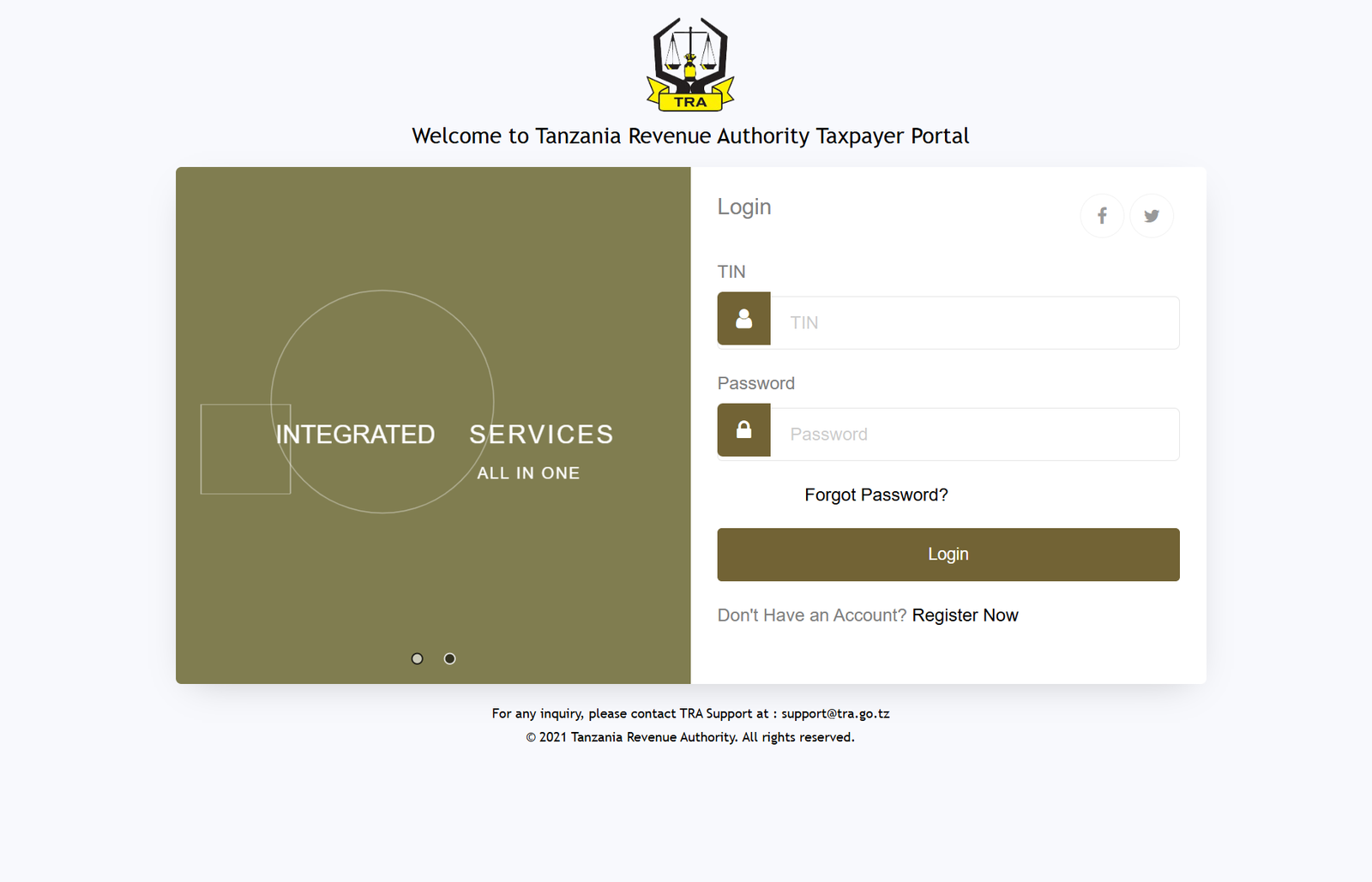
If you run into issues, the portal provides a help section and TRA’s support email: support@tra.go.tz.
Resetting a Password on the Tra Portal
If you’ve forgotten your password, follow this simple path:
Step 1: On the login page, select Forgot Password?
Step 2: Enter your TIN.
Step 3: Follow the on-screen prompts to reset your password.
Step 4: Head back to the login page using the provided link.
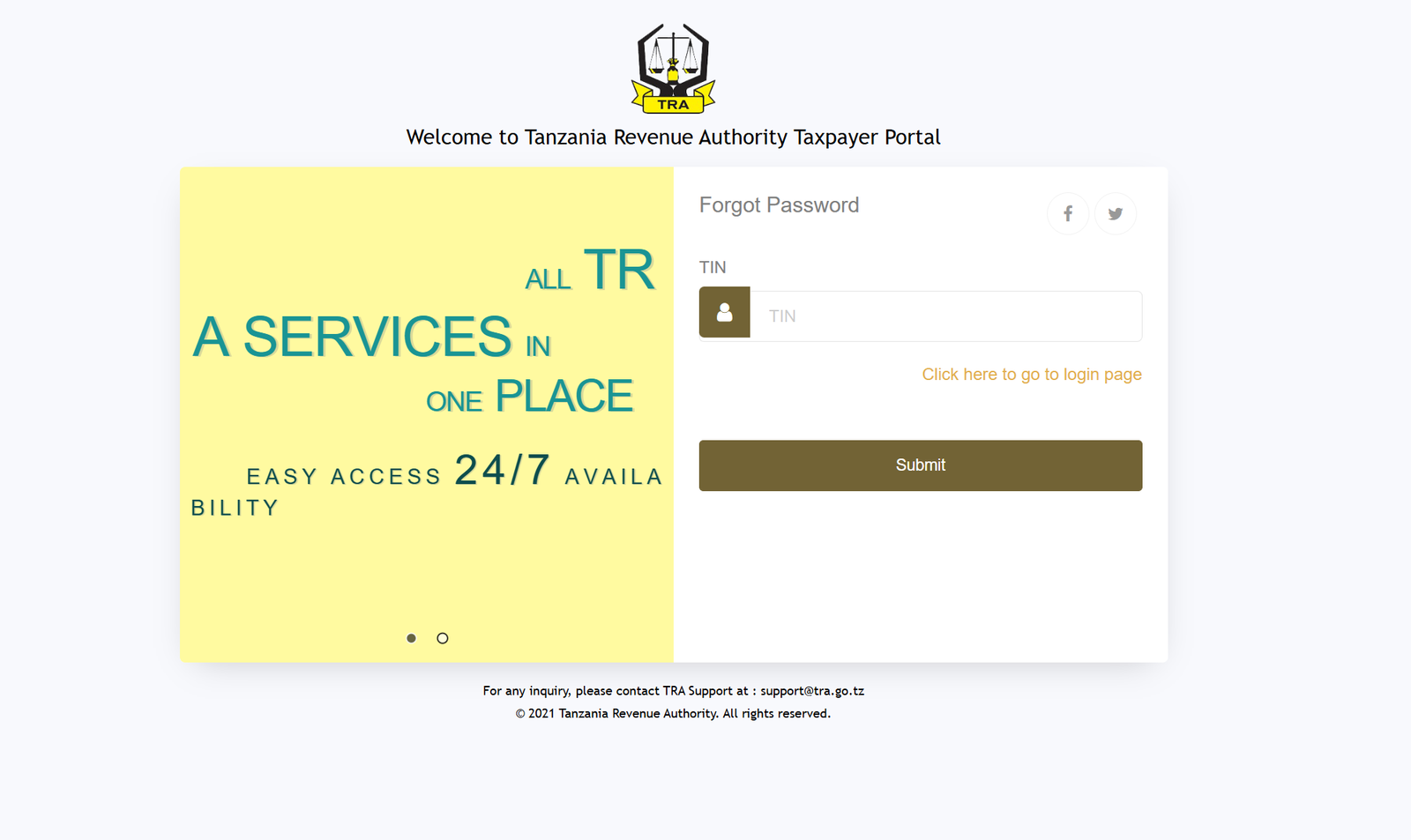
You can always reach support if you’re stuck.
Checking Your Taxpayer Registration Status
This feature is especially helpful when you’ve submitted a TIN application and want to know if it has been approved.
Step 1: From the Tra Portal home screen, open Self Service.
Step 2: Select Taxpayer Identity Number Registration.
Step 3: Click Check Registration Status.
Registering for a TIN Through the Tra Portal
TIN registration can be completed entirely online. The portal offers several options depending on the information you have.
Using Your National Identification Number (NIN)
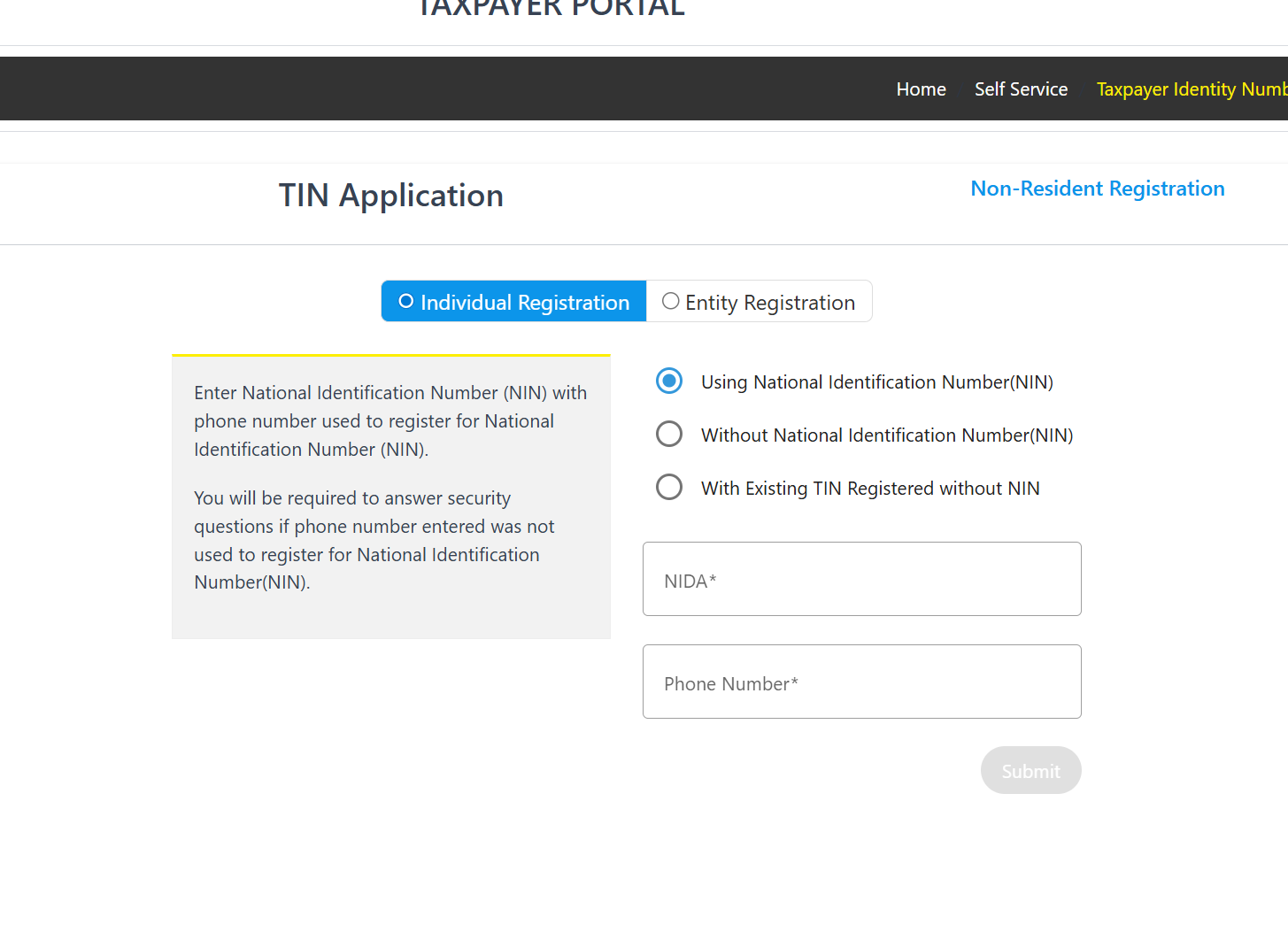
If you have a NIN and the phone number used during your NIDA registration:
Step 1: Enter your NIN.
Step 2: Provide the phone number used during NIN registration.
Step 3: Complete security questions if the system asks for them.
Step 4: Follow the prompts to finalize your TIN application.
Without a NIN
If you don’t have a NIN, you can still apply.
Step 1: Select the option for Without National Identification Number (NIN).
Step 2: Provide the required personal details.
Step 3: Submit your application and monitor updates through Check Registration Status.
With an Existing TIN (Registered Without NIN)
If you already have a TIN that wasn’t linked to your NIN:
Step 1: Choose With Existing TIN Registered without NIN.
Step 2: Confirm your details.
Step 3: Link your TIN to your NIN for future convenience.
What You Can Do Inside the Tra Portal
The platform offers a wide range of services. Here are the most frequently used tools:
TIN Application / Registration
Create a new TIN or update an existing one through an intuitive form.
Filing Tax Returns
Submit returns online for various tax categories without visiting a branch.
Refunds and Overpayment Claims
Request refunds with supporting documents directly from your account.
Tax Payments
Generate control numbers and make secure payments.
Electronic / Virtual Fiscal Device Management
Register, update, or troubleshoot fiscal devices.
Tax Remission Application
Submit remission requests and track their progress.
Electronic Service Providers Returns
A designated place for non-resident returns.
Report Tax Evasion or Staff Misconduct
Submit reports through anonymous or identified channels.
Used Motor Vehicle Valuation Service Calculator
Check valuation estimates before importing or purchasing.
Motor Vehicles & Driving Licenses
Access details related to vehicle information and licensing.
Tips & Quick Answers for Using the Tra Portal
Is the Tra Portal available 24/7?
Yes, the system is designed for round-the-clock access.
What if my phone number doesn’t match my NIDA details?
The portal will trigger security questions to verify your identity.
Where can I get general support?
TRA’s call center and email services (services@tra.go.tz and support@tra.go.tz) handle inquiries, complaints, and system assistance.
Can I use the portal for business and individual services?
Yes, both categories are fully supported.
Helpful Notes
-
Your TIN is essential for nearly all tax processes in Tanzania.
-
Linking your NIN streamlines future transactions and verification.
-
Keep your login credentials secure and update them periodically.
Conclusion
The Tra Portal brings TRA’s essential services into one accessible space, making tax management a smoother experience. Whether you’re registering for a TIN, filing returns, or checking your application status, the steps are easy to follow and available anytime. With a little familiarity, the portal becomes a reliable companion for handling your obligations quickly and confidently.
Go to our Homepage To Get Relevant Information.
Contents
- 1 Getting Started With the Tra Portal
- 2 How to Begin on the Tra Portal
- 3 Step-by-Step Instructions for Common Tasks
- 4 Registering for a TIN Through the Tra Portal
- 5 What You Can Do Inside the Tra Portal
- 5.1 TIN Application / Registration
- 5.2 Filing Tax Returns
- 5.3 Refunds and Overpayment Claims
- 5.4 Tax Payments
- 5.5 Electronic / Virtual Fiscal Device Management
- 5.6 Tax Remission Application
- 5.7 Electronic Service Providers Returns
- 5.8 Report Tax Evasion or Staff Misconduct
- 5.9 Used Motor Vehicle Valuation Service Calculator
- 5.10 Motor Vehicles & Driving Licenses
- 6 Tips & Quick Answers for Using the Tra Portal
- 7 Helpful Notes
- 8 Conclusion