
Introduction
If you’ve ever wished for an easier way to handle licenses, permits, levies, or local government services, the Tausi Portal was designed with exactly that in mind. It brings many important Local Government Authority (LGA) services into one simple, self-service platform—saving you time, paperwork, and unnecessary office visits.
This guide walks you through what the Tausi Portal offers, how to begin, how to create an account, and how to use its most helpful services. Whether you’re a business owner, landlord, fisher, or property holder, you’ll find straightforward steps to help you get what you need.
How to Begin With the Tausi Portal
Before you can apply for services, you’ll need an account. The portal uses your NIN (National Identification Number) as the foundation for registration and login. Individuals will also be asked to update their TIN details, while businesses must submit an introductory letter to their Council so their account can be linked to the correct TIN and NIN information.
Step-by-Step Instructions for Creating an Account on the Tausi Portal
Step 1: Visit the Official Tausi Portal Website
Go to the official login page at:
https://tausi.tamisemi.go.tz/#/welcome
Step 2: Choose Your Registration Method
You’ll see two options when creating an account:
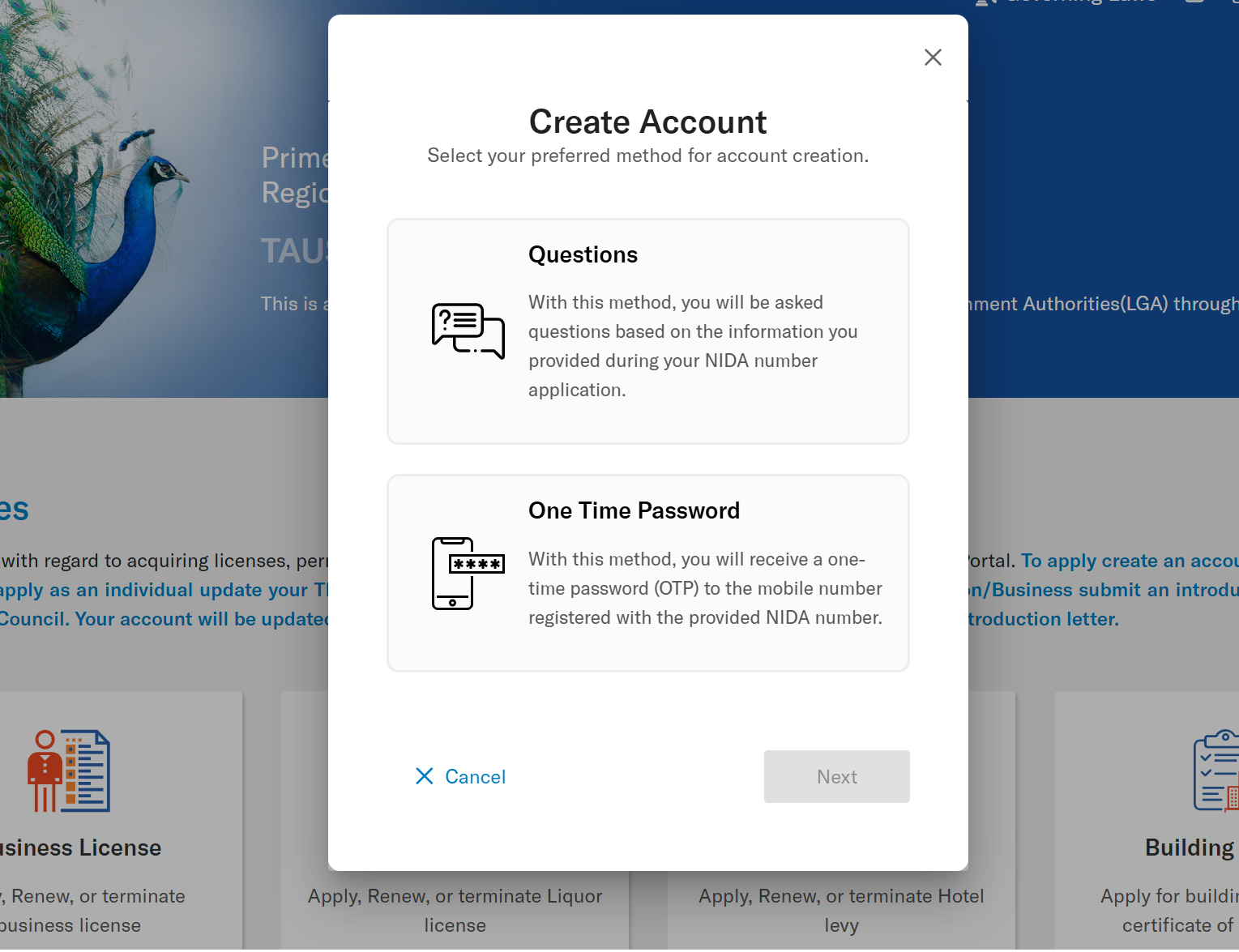
Option A: Security Questions
You’ll answer questions based on the information you provided during your NIDA registration.
Option B: One-Time Password (OTP)
You’ll receive a temporary code sent to your mobile number registered with your NIDA details.
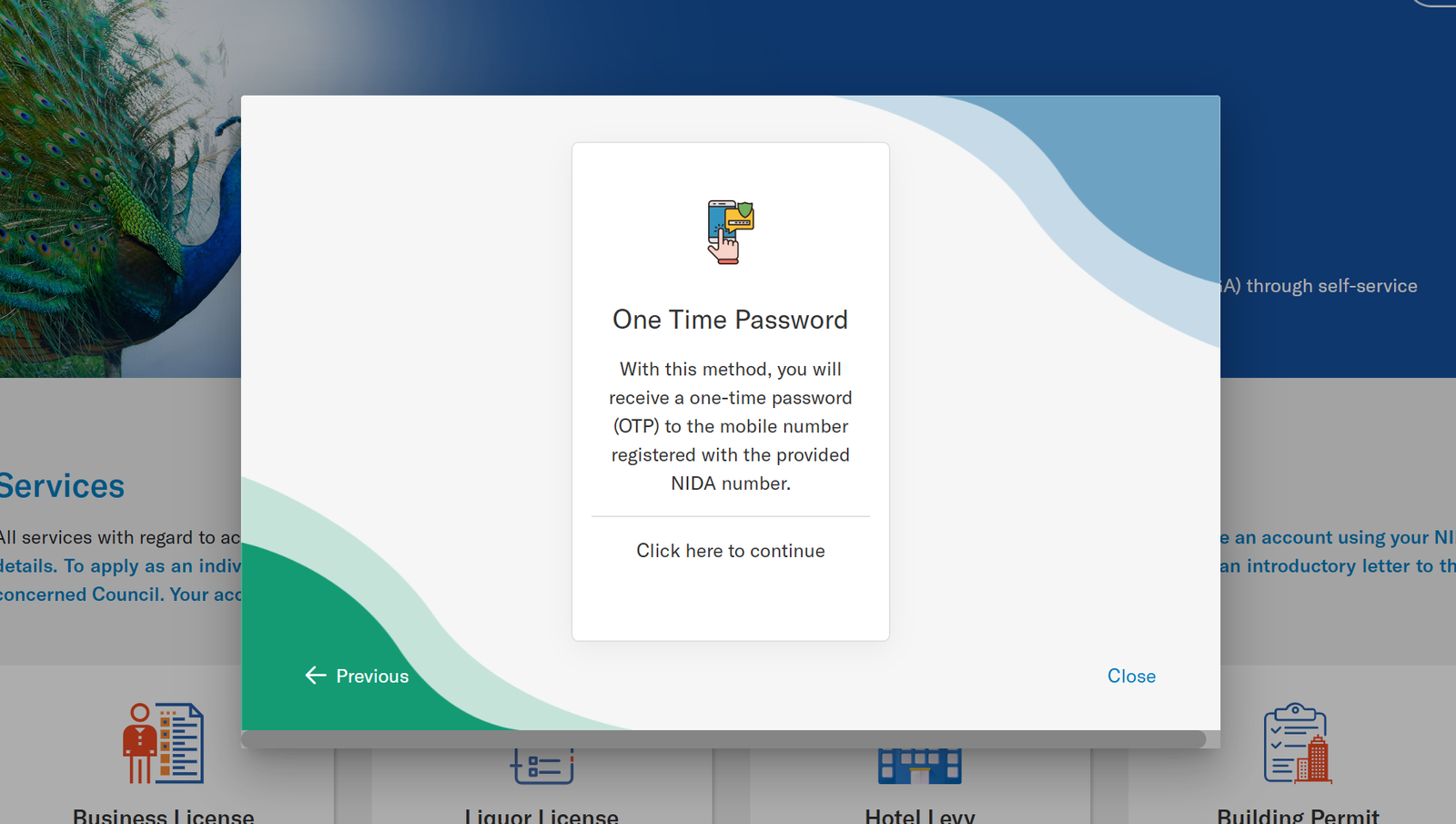
Step 3: Enter Your NIN
Once inside the selected method, provide your NIN and follow the prompts until your account is created successfully.
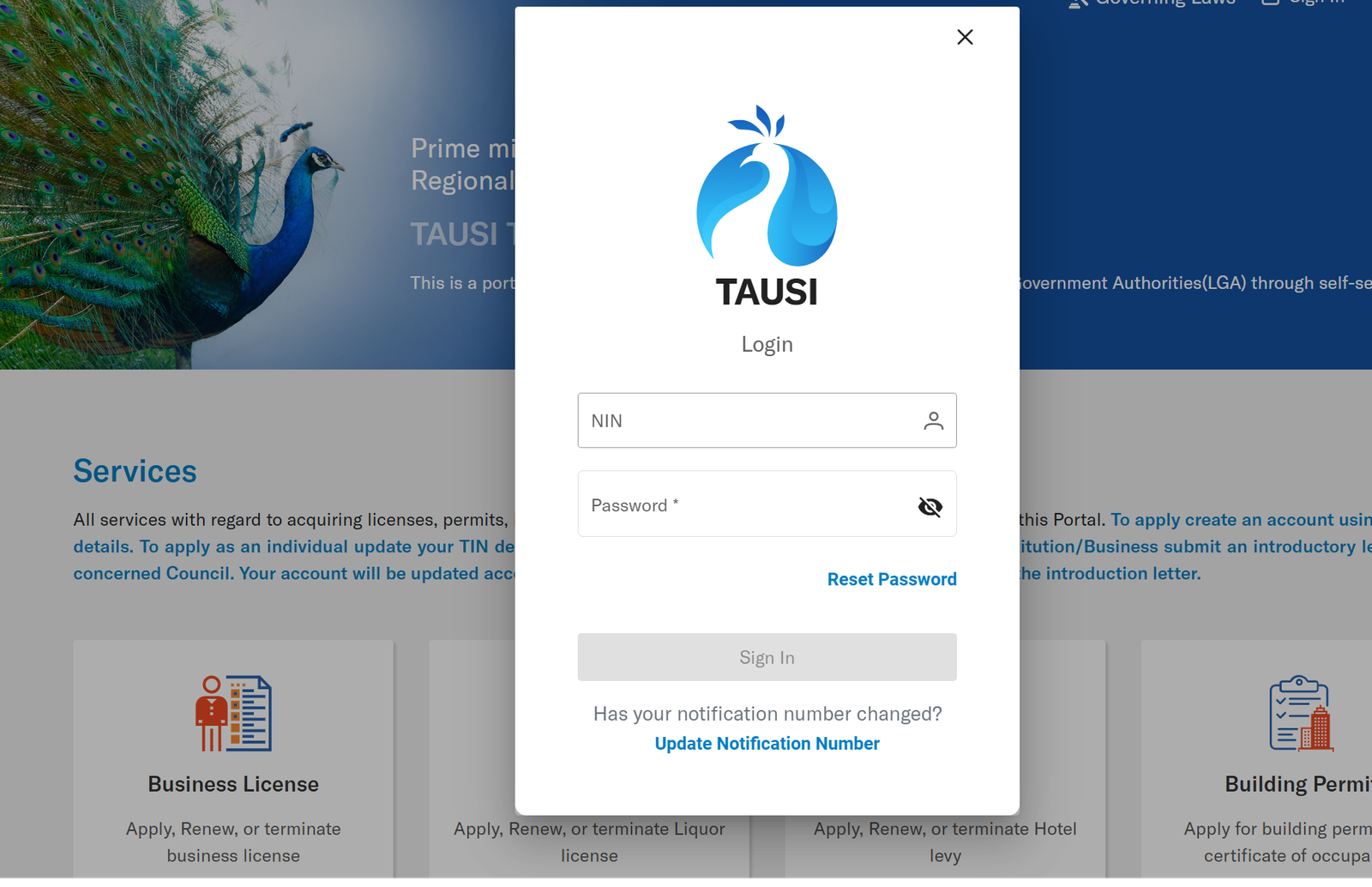
Step 4: Update Your Profile
After logging in for the first time:
-
Individuals should update their TIN (personal TIN).
-
Businesses should submit an introductory letter to their Council so their account can be verified and updated with the correct TIN and NIN.
Available Services on the Tausi Portal
Tausi Portal Services Overview
The platform offers a wide range of services related to licensing, permits, land, rentals, levies, and payments. Here’s a quick look at what you can manage:
Business License
Apply for a new license, renew an existing one, or request termination.
Liquor License
Submit applications, renewals, or cancellation requests.
Building Permit
Apply for building permits and obtain certificates of occupancy.
Fisheries & Vessel Permits
Register fishing vessels and apply for fishing and fishery product licenses.
Hotel Levy
Register, submit turnover, renew levy requirements, and process payments.
Service Levy
Register Class A businesses, declare turnover, and manage levy obligations.
House Rent
Apply, renew, or submit rent information for rental properties.
e-Auction
Register and participate in official auctions.
Land Sales
Register land plots, purchase them, and make related payments.
Parking
Register vehicles and manage parking payments.
Solid Waste
Submit registration and pay waste collection bills. (Note: Some Councils may still be activating this service.)
Billboard
Register, apply, and pay for billboard installations.
Property Tax
Register properties, apply, and process tax payments.
What You Can Do Inside the Tausi Portal
-
Apply for licenses and permits without visiting local offices
-
Make payments securely online
-
Track the status of your applications
-
Renew licenses and levies before expiry
-
Access all your business and property information in one account
The portal is designed to help you manage most requirements from your phone or computer at any time.
Resetting Your Password on the Tausi Portal
If you forget your password or change your mobile number, you can reset your login details using one of two methods:
-
Security Questions: Based on your NIDA registration data
-
One-Time Password (OTP): Sent to your registered mobile number
The process simply confirms your identity and allows you to create a new password safely.
Tips & Quick Answers for Tausi Portal Users
Do I need both NIN and TIN?
Individuals must update their TIN. Businesses need to submit an introductory letter so the Council can sync TIN and NIN details.
Can I apply for services on behalf of a business?
Yes. Once the Council updates your account with the correct business TIN and NIN information.
Is every service active?
Most services are operational, but some may be marked “Service Not Activated” depending on your local Council.
Can I apply from anywhere?
Yes. The portal works online, so all you need is your NIN and an internet connection.
Extra Notes
The Tausi Portal was established under the Prime Minister’s Office—Regional Administration and Local Government—ensuring that all digital services follow governing laws and operate under official oversight. It centralizes many formerly scattered local government processes into one dependable platform.
Conclusion
The Tausi Portal makes it easier than ever to access local government services from one place. Whether you’re applying for a business license, paying for land, or managing property tax, the portal helps you complete your tasks quickly and with fewer steps. Once your account is set up, you’ll have a reliable, organized way to manage your obligations at any time.
Go to our Homepage To Get Relevant Information.
Contents
- 1 Introduction
- 2 How to Begin With the Tausi Portal
- 3 Step-by-Step Instructions for Creating an Account on the Tausi Portal
- 4 Available Services on the Tausi Portal
- 5 What You Can Do Inside the Tausi Portal
- 6 Resetting Your Password on the Tausi Portal
- 7 Tips & Quick Answers for Tausi Portal Users
- 8 Extra Notes
- 9 Conclusion