
Air Tanzania: A Friendly, Helpful Guide for Smooth Booking, Check-ins, and Travel
Introduction
Air Tanzania has become a trusted choice for travelers who want comfort, simplicity, and access to some of Africa’s most breathtaking destinations. Whether you’re planning a business trip, a family holiday, or a quick regional getaway, understanding how to use the airline’s online tools makes everything easier.
This guide walks you through how to book a flight, manage your trip, register for the loyalty program, reset a password, and make the most of available services all in clear, practical steps.
How to Begin with Air Tanzania
Air Tanzania offers an online platform that lets you book flights, check in, review bookings, and access helpful services. If you’re visiting for the first time, the homepage gives you quick access to everything you need.
You’ll find options for booking your flight, checking flight schedules, managing your reservation, and exploring deals on hotels or car rentals.
Step-by-Step Instructions for Using Air Tanzania Online
Step 1: Visit the Official Website
Go to the official website at https://www.airtanzania.co.tz/ to get started.
Step 2: Choose “Book Flight”
From the homepage, select BOOK FLIGHT. This opens the booking panel where you can:
-
Choose your departure and arrival cities
-
Select departure and return dates
-
Add the number of adults, children, or infants
-
Search for available fares
Step 3: Review and Confirm
Once the system shows available flights, choose the option that fits your schedule and budget. Follow the instructions to enter passenger details and complete payment securely.
Available Services from Air Tanzania
Book Flight
Plan and pay for your trip online in minutes using any device.
Online Check-In
Check in before arriving at the airport to save time and secure your preferred seat.
View My Booking
Retrieve or modify an existing booking when you need to confirm details or update information.
Hotels
Air Tanzania partners with global platforms to help you find hotel deals wherever you’re going.
Rent a Car
You can book your ride ahead of time and take advantage of competitive rental rates.
Special Services
This includes baggage guidelines, visa requirements, lounges, shuttle services, and travel advisories—especially helpful for long-haul travelers or frequent flyers.
What You Can Do with Your Air Tanzania Account
Creating an account unlocks added convenience, especially if you fly often. From managing bookings to earning loyalty miles, having an account keeps everything in one place.
Registration: How to Join the Air Tanzania Loyalty Program
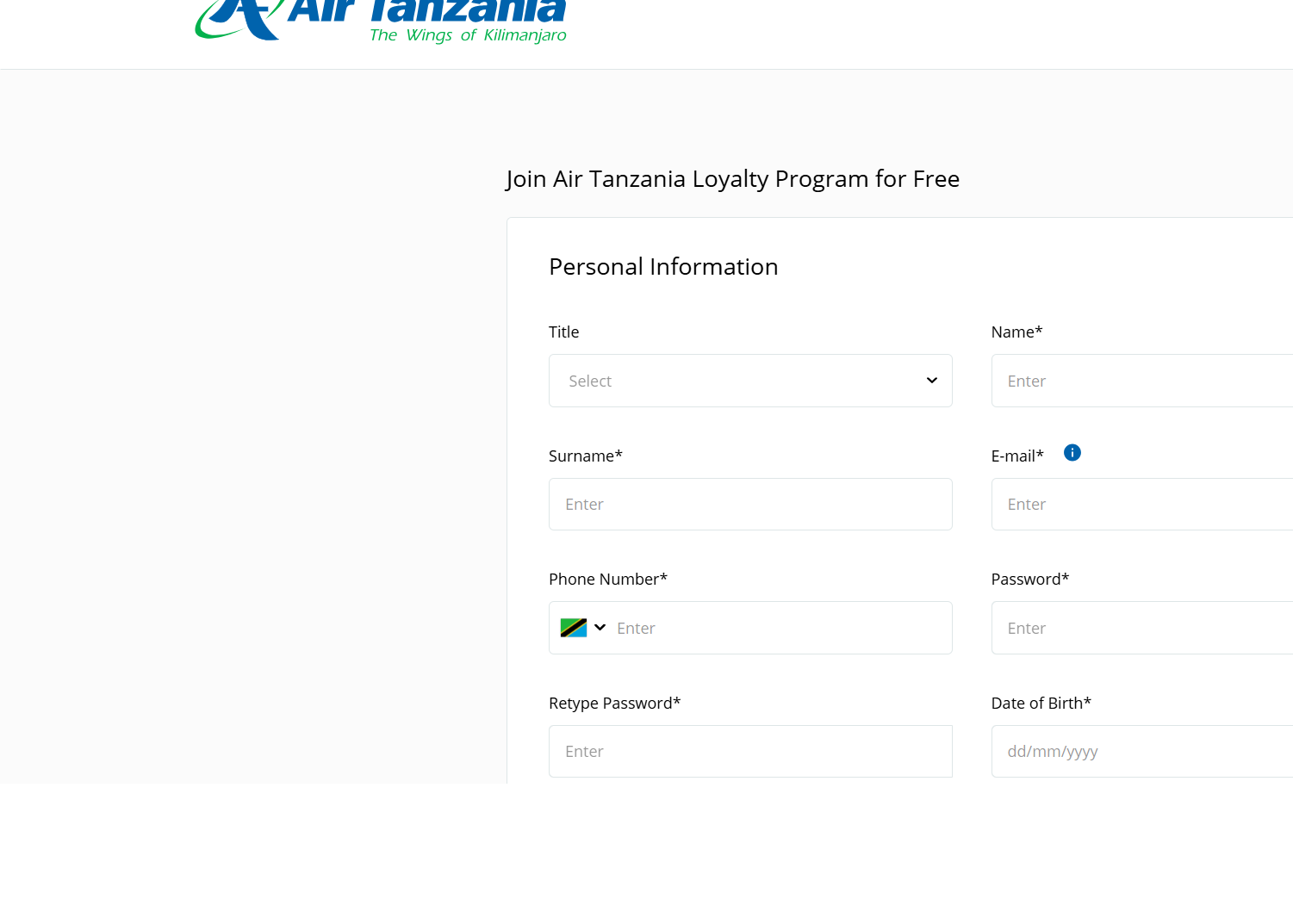
Becoming a member of Twiga Miles, the Air Tanzania loyalty program, is free and only takes a moment.
Step 1: Open the Sign-Up Page
On the homepage, select Twiga Miles Login, then click Sign Up.
Step 2: Complete Your Personal Details
You’ll be asked to provide:
-
Name and surname
-
Email address
-
Phone number
-
Password
-
Date of birth
-
Nationality
You must also accept the general terms and conditions.
Step 3: Submit and Activate
Once you submit your form, an activation or confirmation message is sent to your email. After activation, you can log in anytime with your Member ID and password.
Resetting Your Password
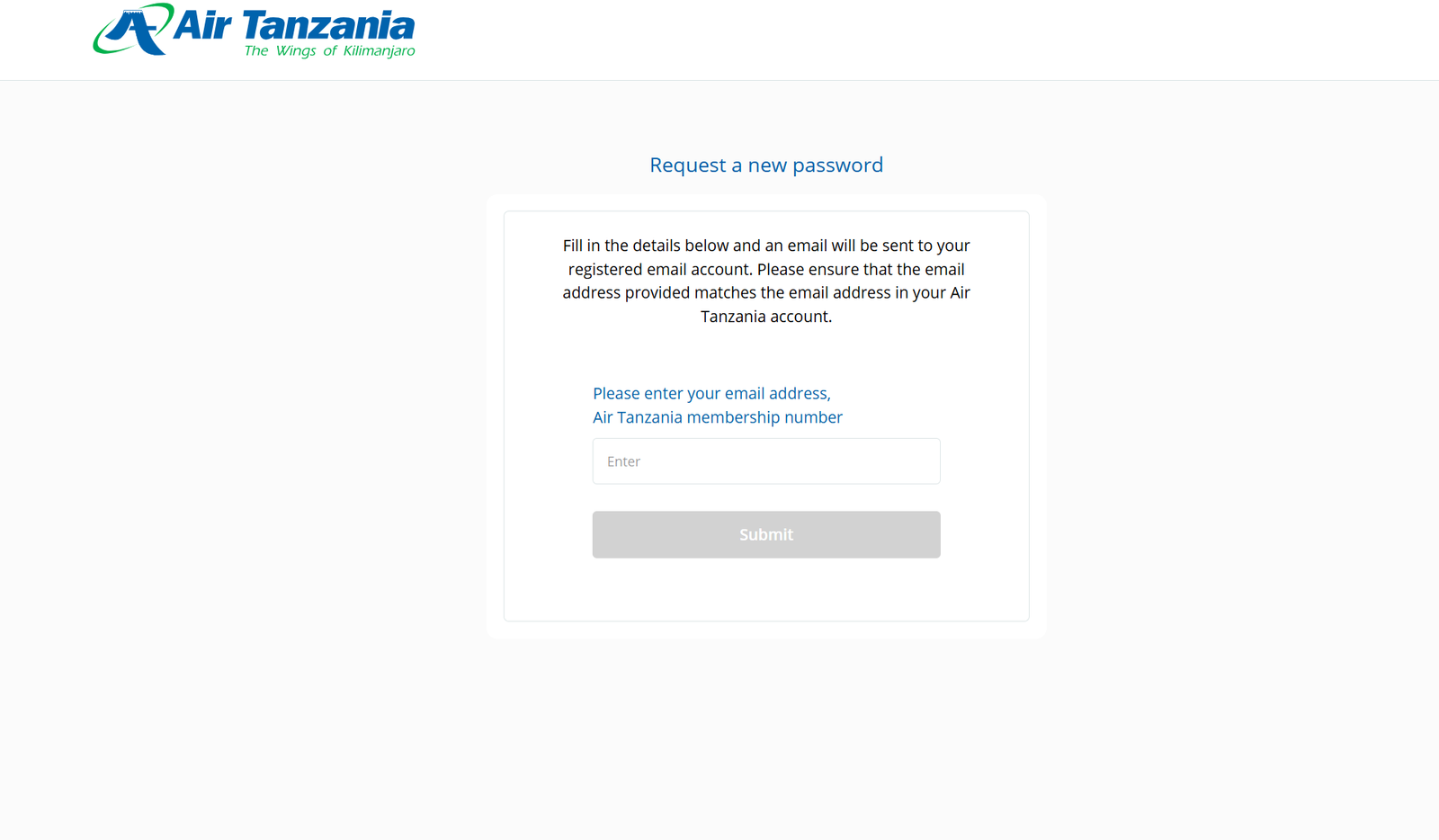
If you forget your login password, Air Tanzania makes it simple to reset it.
Step 1: Select “Forgot Password?”
From the Sign In panel, click Forgot Password?
Step 2: Enter Required Details
Provide your registered email and your Air Tanzania membership number.
Step 3: Check Your Email
A reset link or new password instructions will be sent to your inbox.
Checking Your Status and Managing Your Trip
Inside your account, you can:
-
View your trip history
-
Check upcoming journeys
-
Verify earned Twiga Miles
-
Update your personal information
-
Revisit previous bookings or download itineraries
This helps you stay organized and aware of your travel activity.
Tips & Quick Answers for Air Tanzania Users
1. When should I book?
Booking early often gives you better fare options and more seating choices.
2. Can I check in online?
Yes. Online check-in is available for most flights, saving time at the airport.
3. Does Air Tanzania offer good connections?
The airline connects Dar es Salaam to popular cities such as Harare, Lusaka, Mbeya, and Mumbai with competitive fares.
4. Where do I get travel advisories?
The Plan Travel and Journey sections on the website share helpful information on visas, health requirements, and seasonal updates.
Extra Notes
-
Air Tanzania’s headquarters is located at ATC House, Ohio Street, Dar es Salaam, Tanzania.
-
Customer support is available by phone at +255 748 773 900 or by email at info@airtanzania.co.tz.
-
The website also includes sections for careers, tenders, aviation training, and agency access.
Conclusion
Air Tanzania continues to grow as a dependable airline for both regional and international travel. When you understand how its online tools work—from booking to checking in to managing your membership—you save time, reduce stress, and enjoy a smoother journey.
Whether you’re planning a short trip or a long adventure, these steps ensure you’re ready to travel with confidence.
Go to our Homepage To Get Relevant Information.
Contents
- 1 Air Tanzania: A Friendly, Helpful Guide for Smooth Booking, Check-ins, and Travel
- 1.1 Introduction
- 1.2 How to Begin with Air Tanzania
- 1.3 Step-by-Step Instructions for Using Air Tanzania Online
- 1.4 Available Services from Air Tanzania
- 1.5 What You Can Do with Your Air Tanzania Account
- 1.6 Registration: How to Join the Air Tanzania Loyalty Program
- 1.7 Resetting Your Password
- 1.8 Checking Your Status and Managing Your Trip
- 1.9 Tips & Quick Answers for Air Tanzania Users
- 1.10 Extra Notes
- 1.11 Conclusion