
Brela Ors: A Simple, Friendly Guide to Getting Started Online
Introduction
Brela Ors is the Online Registration System that helps individuals and businesses in Tanzania handle essential registrations and updates without the hassle of visiting an office. Whether you’re registering a business name, filing company documents, applying for a patent, or checking the status of an existing record, the platform brings everything into one place.
This guide walks you through how Brela Ors works, how to open an account, how to log in, and what you can do once you’re inside. If you’re new to the system, you’ll find step-by-step help to get started smoothly.
How to Begin With Brela Ors
Before you can use any service on the platform, you need a registered account. The process is short, and once you complete it, you’ll be able to access a full range of business and industrial property services.
Step-by-Step Instructions for Using Brela Ors
Step 1: Visit the Official Brela Ors Portal
Go to the Online Registration System homepage:
https://ors.brela.go.tz/ors/start?returnUrl=%2fbrela%2fprod%2fors
This is where you can register, log in, search for business information, and access all available features.
Step 2: Create Your Account (If You’re New)
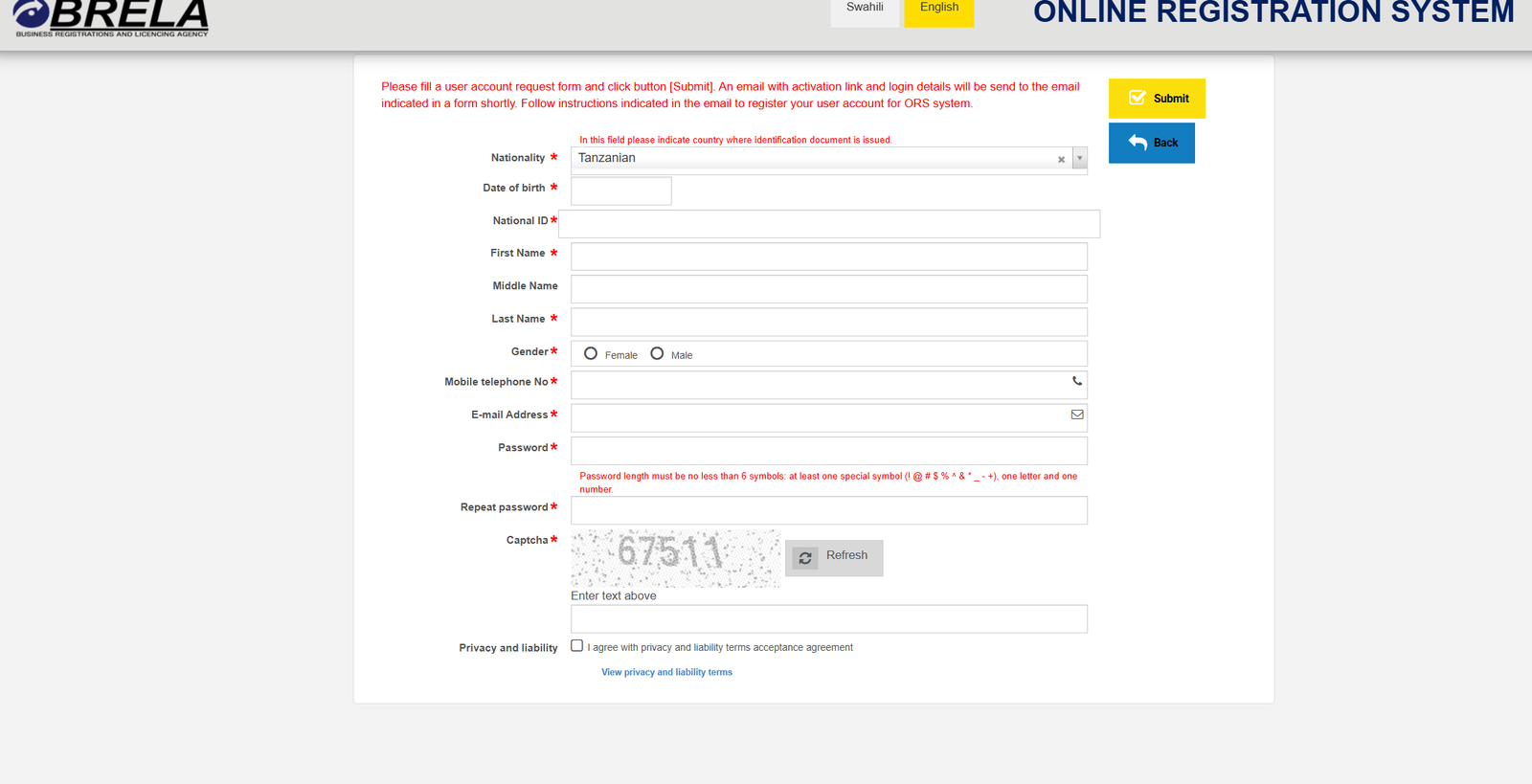
Select Create ORS account. You’ll be asked to fill in information such as:
-
Country of ID issuance
-
Nationality
-
Date of birth
-
National ID
-
First, middle, and last names
-
Gender
-
Mobile number
-
Email address
-
Password and confirmation
-
Captcha verification
Once you submit the form, an activation email will be sent to the address you provided. Follow the instructions in that email to complete your account setup.
Step 3: Log In to Brela Ors
If you already have an active account, go to E-services for registered users, enter your username and password, and log in.

If you’ve forgotten your password, simply select Forgot your password? and follow the reset steps.

Step 4: Choose the Service You Need
Once logged in, you can select from the full list of online services, including business registration, company filings, or industrial property applications.
What You Can Do Inside Brela Ors
Brela Ors brings several useful services into one portal. Here’s a quick look at what you can access.
Business Name Services
-
Register a new business name
-
Change particulars
-
Pay annual maintenance fees
-
Submit cessation notice
-
Update business details
Company Services
-
Register a company
-
Update particulars
-
File company documents
-
Submit annual returns
Industrial Licence Services
-
Apply for a licence
-
Change particulars
-
File annual progress reports
-
Apply for cancellation
Mark and Patent Services
-
Register trademarks
-
File trademark-related documents
-
Register patents or utility models
-
Submit patent-related filings
Information Services
Brela Ors lets you search for:
-
Business name registration numbers
-
Company incorporation or compliance numbers
-
Registered addresses
-
Current status of an entity
You can also request short or detailed extracts and order a Mark Index Review by Nice class, valid for three days.
Industrial Property Journals
You can browse journals and filter results by date to view recent publications.
Tips & Quick Answers About Brela Ors
Payments
You can pay for e-services using:
-
Tigo Pesa
-
M-Pesa
-
Direct payments at CRDB or NMB banks
Free Searches
If you need to confirm an identifier before filing, use Free Search to look up the registration number of a business name or a company. Keep in mind that only information registered or updated via Brela Ors will appear.
Registration Details: What to Know Before You Sign Up
When creating your Brela Ors account, make sure to:
-
Use an email you check often; activation instructions will arrive shortly after you submit your form.
-
Meet password requirements: at least six characters, one special symbol, one letter, and one number.
-
Agree to the privacy and liability terms before submitting.
Resetting a Password
If you lose access to your Brela Ors account:
-
Go to the login page.
-
Click Forgot your password?
-
Enter your email and follow the instructions sent to you.
This ensures you can recover your account without creating a new one.
Checking Your Status
Whether you’re tracking a business name, a company, or a mark, Brela Ors makes it simple to verify your current registration details. Use the Free Search feature or request a formal information extract if you need something official.
Extra Notes
Brela Ors is designed to simplify workflows that traditionally took days of paperwork. By centralizing registrations, updates, and searches, it saves users time and provides clear visibility into existing records. As long as you keep your account active and your identifiers on hand, you can complete almost everything online.
Conclusion
Brela Ors gives entrepreneurs, companies, and innovators an easier way to manage essential legal and registration tasks. Once your account is set up, the platform becomes a reliable space to handle business names, company filings, trademarks, patents, and more—anytime you need it.
If you’re just getting started, follow the steps above and you’ll be ready to use the system confidently.
Go to our Homepage To Get Relevant Information.
Contents
- 1 Brela Ors: A Simple, Friendly Guide to Getting Started Online
- 1.1 Introduction
- 1.2 How to Begin With Brela Ors
- 1.3 Step-by-Step Instructions for Using Brela Ors
- 1.4 What You Can Do Inside Brela Ors
- 1.5 Tips & Quick Answers About Brela Ors
- 1.6 Registration Details: What to Know Before You Sign Up
- 1.7 Resetting a Password
- 1.8 Checking Your Status
- 1.9 Extra Notes
- 1.10 Conclusion