
Ess Utumishi Go Tz: A Simple, Friendly Guide to Using the Watumishi Portal
If you work in Tanzania’s public service, you’ve probably already heard of Ess Utumishi Go Tz, the online Employee Self-Service portal provided by the President’s Office – Public Service Management and Good Governance. The portal makes daily HR tasks easier, helps you keep your information updated, and gives you access to important services without having to visit an office.
This guide walks you through how to begin, how to log in, how to register if you’re new, and how to reset your password when needed. Everything is broken into clear steps so you can move through the portal confidently.
What You Can Expect From This Guide
You’ll learn:
-
What Ess Utumishi Go Tz is and why it matters
-
How to access your account
-
How to register as a new user
-
How to reset your password
-
Key features and services available inside the portal
-
Helpful tips if you get stuck
Getting Started With Ess Utumishi Go Tz
The portal is designed for government employees who want quick access to HR records and personal details. Before you begin, make sure you have your Check Number, National ID, and an active email address, as you’ll need them for login and registration.
How to Begin
Here’s the quickest way to start using Ess Utumishi Go Tz.
Step-by-Step Instructions
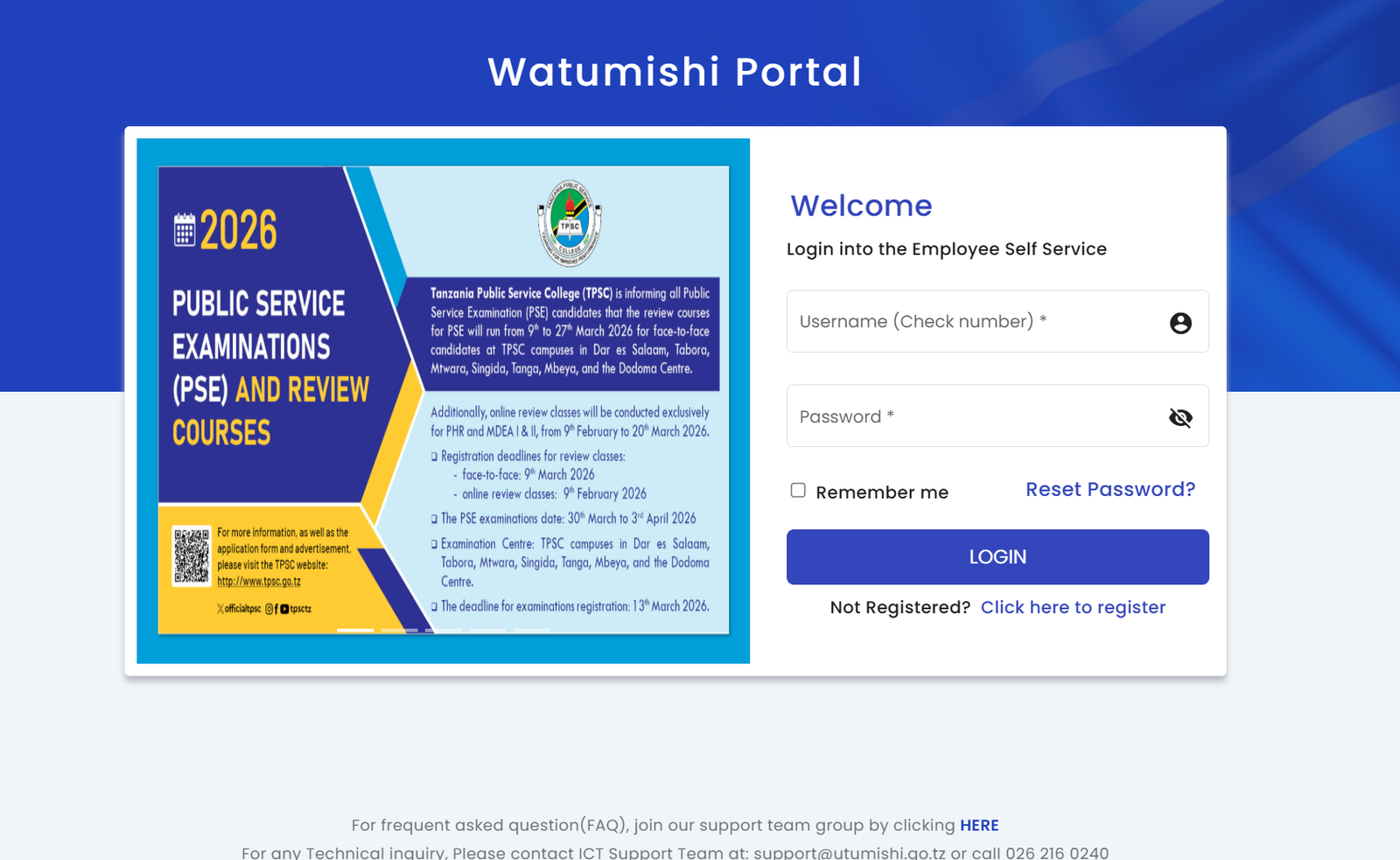
Step 1: Visit the Official Login Page
Go to the Employee Self Service portal at:
https://ess.utumishi.go.tz/sessions/signin
This is where you’ll log in or begin registration.
Step 2: Enter Your Login Details
Type in your Check Number and Password.
If you want the system to remember your device, you can select “Remember me.”
Step 3: Access Your Account
After entering your details, click Login.
You’ll be taken to your dashboard, where you can view and update your information.
If you run into any trouble, scroll to the bottom of the page for support contacts.
Not Registered Yet? Here’s How to Create an Account
If you’re using Ess Utumishi Go Tz for the first time, you’ll need to register. The process is straightforward.
How to Register
-
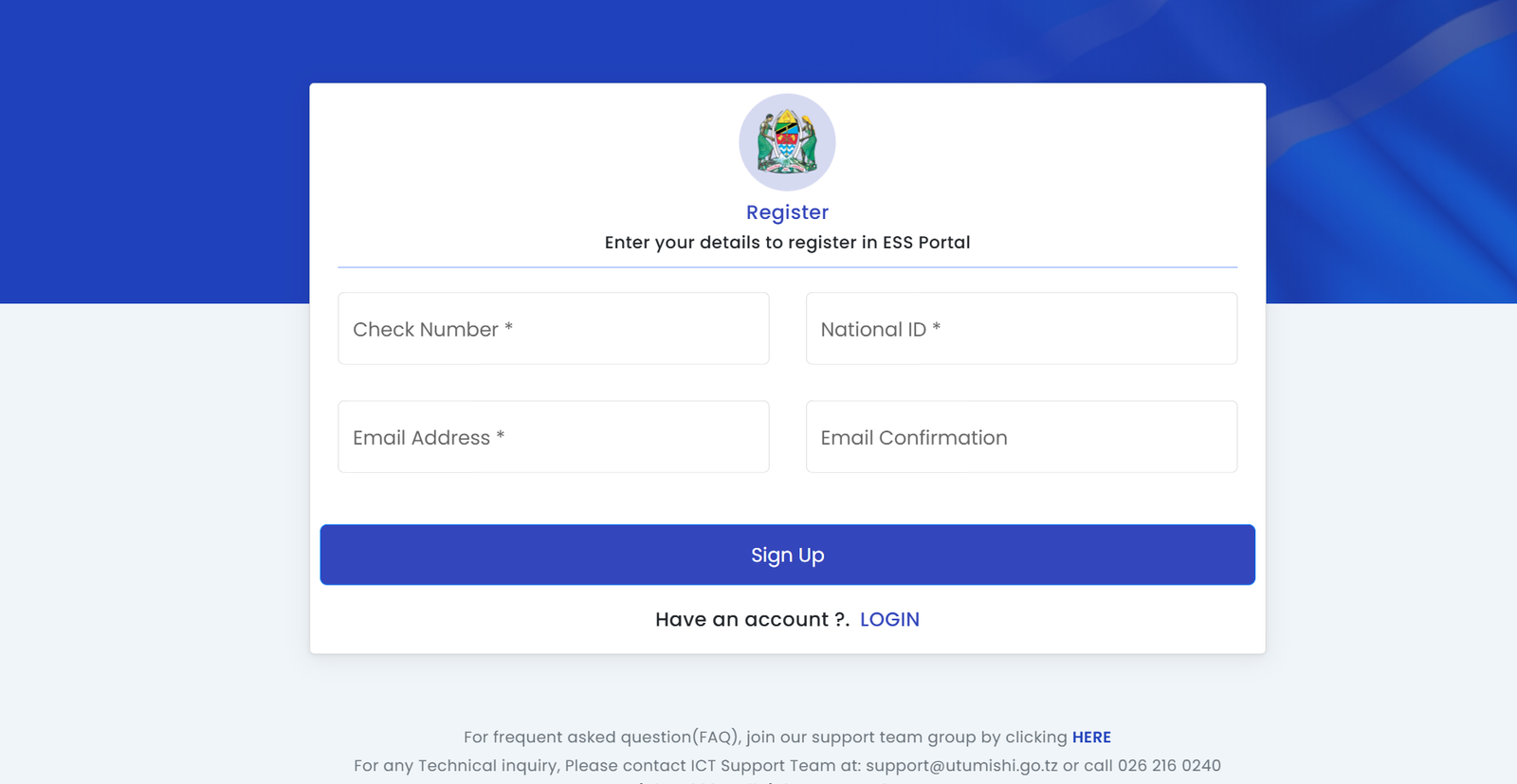
Go to the login page and click “Not Registered? Click here to register.”
-
Fill in the required information:
-
Check Number
-
National ID
-
Email Address
-
Confirm your email
-
-
Submit the form and check your email for further instructions.
-
Once your account is approved, return to the login page to sign in.
Registration only takes a few minutes as long as your details match the government records.
Resetting Your Password on Ess Utumishi Go Tz
Sometimes passwords slip our minds. Luckily, the portal makes it easy to reset yours.
How to Reset It
-
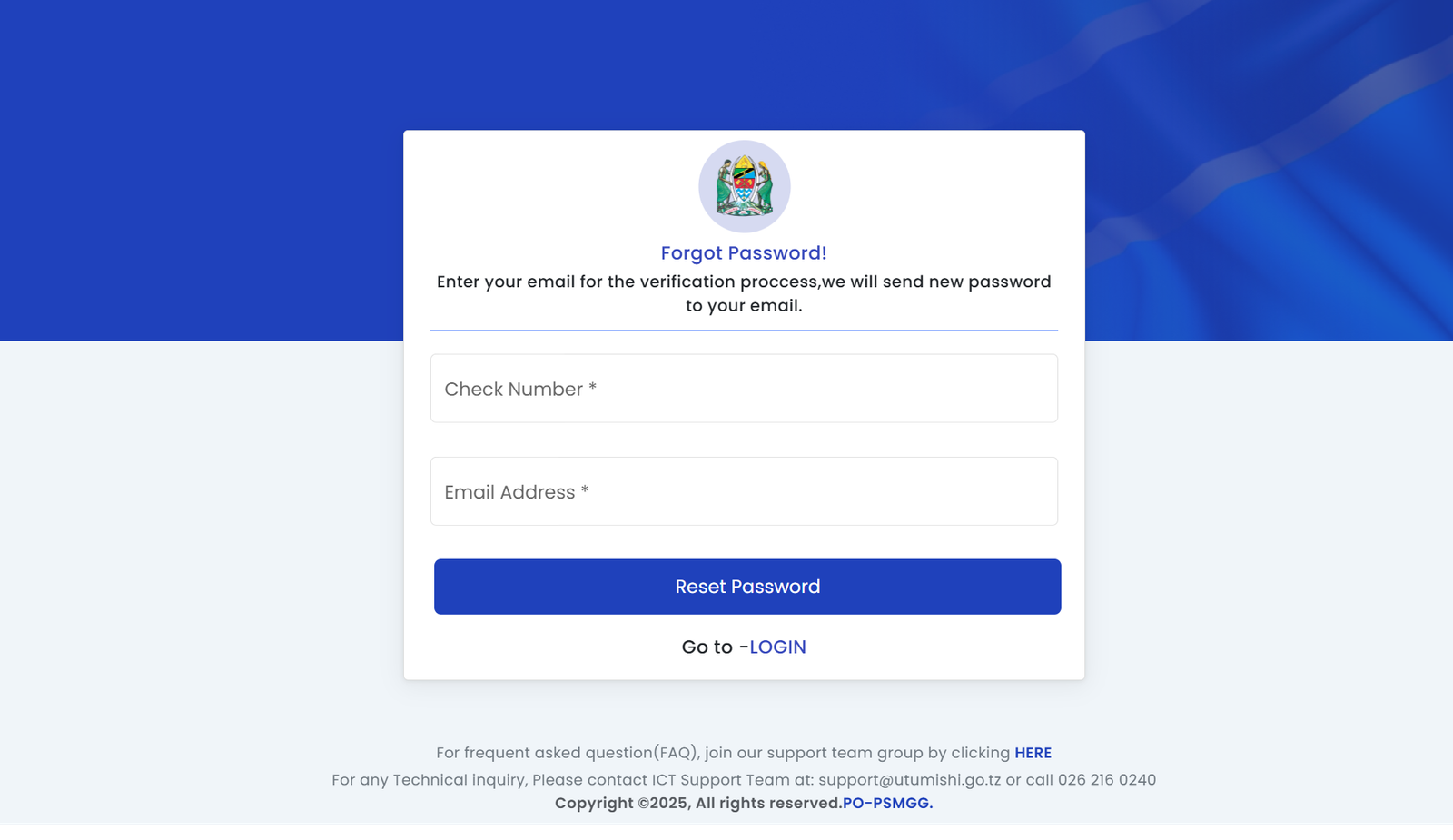
On the login page, click Reset Password?
-
You’ll see a page asking for:
-
Your Check Number
-
Your Email Address
-
-
Submit the form and check your inbox for a message with your new password.
-
Return to the login page and sign in using the updated details.
If you don’t receive an email, double-check that the address you entered is correct and active.
What You Can Do Inside Ess Utumishi Go Tz
After logging in, you’ll find several features designed to help you manage your employment details. While your exact view may vary, here are some common tools:
Personal Information
Update contact details, view your profile, and make sure everything is accurate.
Employment Records
View job history, current position, and other HR-related data.
Leave Management
Check your leave balances or apply for leave depending on system availability.
Notifications & Announcements
Stay informed about updates from the President’s Office – Public Service Management and Good Governance.
Support Resources
Links to FAQs and support groups are available for quick help.
Tips & Quick Answers for Ess Utumishi Go Tz Users
-
Keep your email active. All password resets and notifications depend on it.
-
Use your correct Check Number. Most login issues come from entering the wrong one.
-
Confirm your National ID carefully during registration to avoid delays.
-
Need help? You can always reach ICT Support at support@utumishi.go.tz or call 026 216 0240.
Helpful Extras & Background Notes
-
The portal belongs to the United Republic of Tanzania, President’s Office – Public Service Management and Good Governance (PO-PSMGG).
-
Information on the site is protected, so always keep your login credentials private.
-
If you experience difficulties, the FAQ or support group link on the login or registration pages can offer quick guidance.
Conclusion
Using Ess Utumishi Go Tz doesn’t have to be complicated. With the steps above, you can log in, register, reset your password, and explore the services available to you. The portal is designed to save time and make your work life easier, so keep your details up to date and check in whenever you need HR-related information.
If you ever get stuck, support is only an email or phone call away.
Go to our Homepage To Get Relevant Information.
Contents
- 1 Ess Utumishi Go Tz: A Simple, Friendly Guide to Using the Watumishi Portal
- 1.1 What You Can Expect From This Guide
- 1.2 Getting Started With Ess Utumishi Go Tz
- 1.3 How to Begin
- 1.4 Not Registered Yet? Here’s How to Create an Account
- 1.5 Resetting Your Password on Ess Utumishi Go Tz
- 1.6 What You Can Do Inside Ess Utumishi Go Tz
- 1.7 Tips & Quick Answers for Ess Utumishi Go Tz Users
- 1.8 Helpful Extras & Background Notes
- 1.9 Conclusion