
Rita Online: A Friendly Guide to Using Tanzania’s eRITA Portal
If you’ve ever needed to apply for a birth certificate, death certificate, or verify important records, you’ve likely heard about Rita Online, the digital gateway to RITA’s essential civil services in Tanzania. This guide is designed to make your experience smoother—whether you’re signing up for the first time, checking an ongoing application, or simply trying to understand what you can do on the platform.
You’ll find clear steps, simple explanations, and helpful notes to get you comfortable with the portal and confident in using its services.
Getting Started with Rita Online
The Rita Online platform brings birth and death registration services into one unified digital space. Instead of visiting physical offices for every request, you can now handle many tasks from your computer or phone.
Here’s what this guide will help you do:
-
Create your account
-
Sign in and access services
-
Submit applications for certificates
-
Check your application status
-
Reset a forgotten password
-
Understand available services and how they work
How to Begin with Rita Online
Before you can apply for anything, you need an account. Signing up is simple and only takes a few minutes.
Step 1: Visit the Official Portal
Go to the official eRITA website:
https://erita.rita.go.tz/
This is your starting point for all Rita Online services.
Step 2: Register an Account
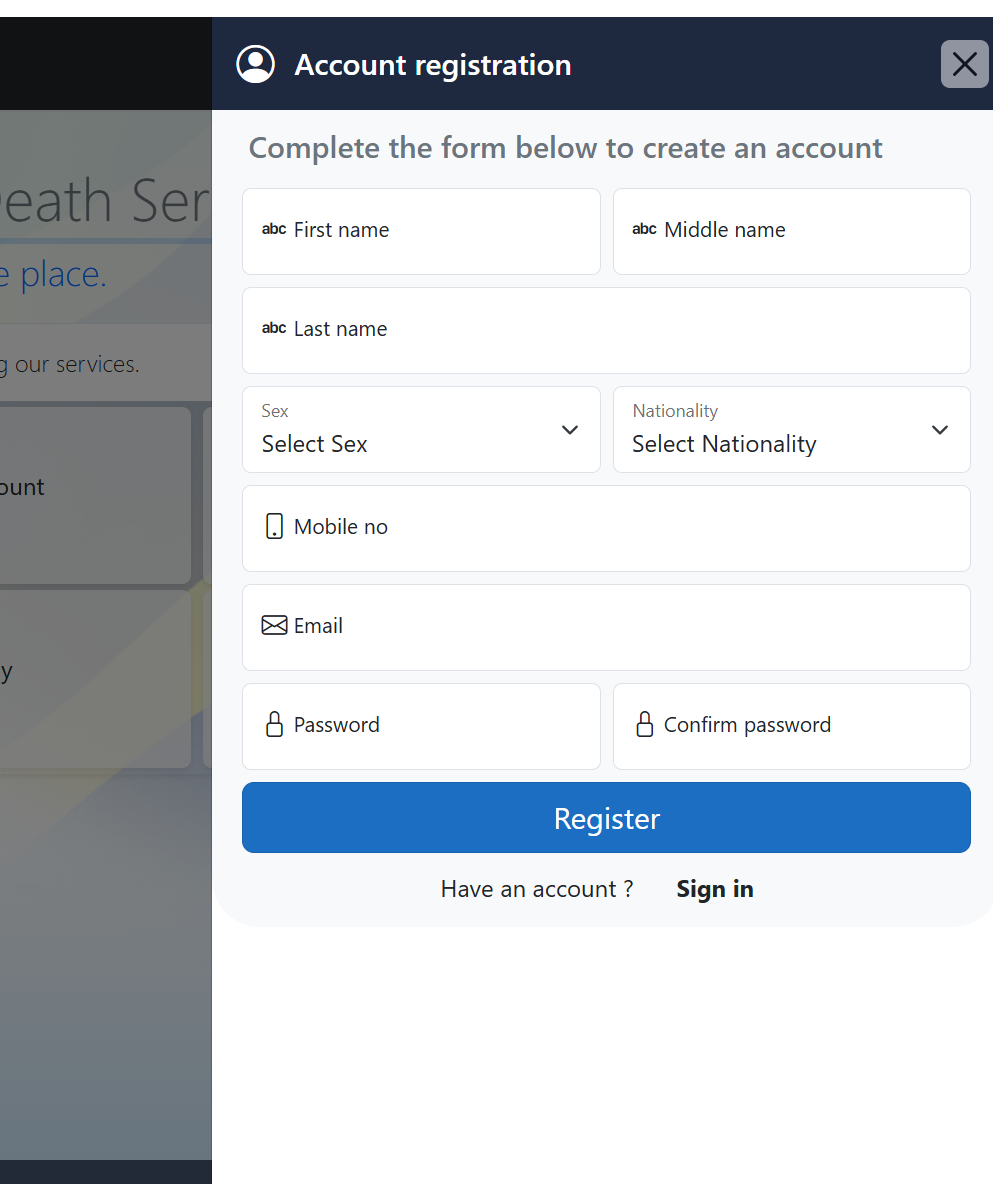
Select Registration to open the account setup page. You’ll be asked for basic details such as:
-
First, middle, and last name
-
Sex
-
Nationality
-
Mobile number
-
Email
-
Password and confirmation
Once everything is filled in, submit the form to create your account.
Step 3: Sign In
After registering, return to the homepage and click Sign in.
Enter your registered email and password, and you’ll be taken to your dashboard.

Step-by-Step Instructions for Using Rita Online
Applying for a Birth Certificate
-
Sign in to your Rita Online account.
-
Select Birth from the services menu.
-
Fill out the required information about the person whose certificate you’re applying for.
-
Upload any requested documents.
-
Submit the application and note the reference number.
Applying for a Death Certificate
-
Sign in to your account.
-
Choose Death from the menu.
-
Provide the necessary details and supporting documents.
-
Submit and keep your reference number handy.
Verifying Certificates
The Verification service helps you confirm the authenticity of birth or death certificates.
-
Log in.
-
Select Verification.
-
Enter the certificate details and submit the request.
Checking Your Application Status
If you’ve already applied, there’s no need to visit an office to follow up.
-
Go to the homepage.
-
Select Check application status.
-
Enter your reference details to view updates.
Available Services on Rita Online
The platform brings all major civil registration services into one place:
Birth Registration
Straightforward online application for new or replacement birth certificates.
Death Registration
Submit applications for official death certificates, often required for legal and family matters.
Certificate Verification
A useful service for employers, schools, and individuals needing quick document confirmation.
Account Services
Manage your profile, update contact information, and keep your login credentials current.
What You Can Do on Rita Online
-
Register for an account
-
Apply for birth or death certificates
-
Verify certificates
-
Track application progress
-
Reset your password
-
Manage and update account details
Everything is designed to save you time and unnecessary travel.
Registering Your Account on Rita Online
During registration, the system will request personal details to securely create your account. Ensure your mobile number and email are correct since they’re used for communication and password recovery.
Resetting Your Password on Rita Online
Forgot your login? It happens. Here’s how to recover access:
-
Go to the Reset password page on the portal.
-
Enter your registered email address.
-
Follow the instructions sent to your inbox to create a new password.
This quick process helps you get back into your account without needing support visits.

Additional Notes and Helpful Definitions
-
RITA stands for Registration, Insolvency and Trusteeship Agency, the institution responsible for civil registrations in Tanzania.
-
The eRITA Portal is the official online platform where these services are offered.
-
You must keep your reference numbers safe—they’re essential for checking your application status.
-
Document verification helps prevent fraud and ensures authenticity.
Conclusion
Using Rita Online makes managing essential civil records simpler and far more convenient. With a single account, you can apply for certificates, verify documents, and track everything from home. Whether you’re handling personal paperwork or supporting a family member, the portal gives you a clear, reliable path to what you need.
Go to our Homepage To Get Relevant Information.
Contents
- 1 Rita Online: A Friendly Guide to Using Tanzania’s eRITA Portal
- 1.1 Getting Started with Rita Online
- 1.2 How to Begin with Rita Online
- 1.3 Step-by-Step Instructions for Using Rita Online
- 1.4 Available Services on Rita Online
- 1.5 What You Can Do on Rita Online
- 1.6 Registering Your Account on Rita Online
- 1.7 Resetting Your Password on Rita Online
- 1.8 Additional Notes and Helpful Definitions
- 1.9 Conclusion